What is FTTN? NBN fibre to the node explained
FTTN is the NBN connection type that runs fibre to a cabinet and uses the existing copper phone line for the rest. Here's how fibre to the node works, why speeds vary, and how to move to full fibre.
On this page
- Quick facts
- What does FTTN mean?
- How does FTTN work?
- What speeds can you get on FTTN?
- Why your FTTN line may not reach your plan speed
- FTTN reliability
- What equipment do you need for FTTN?
- How to get the best speed from FTTN
- FTTN vs FTTP: what's the difference?
- Can you upgrade from FTTN to FTTP?
- Will I be forced to leave FTTN?
- How to check if you have FTTN
- Does FTTN work in a blackout?
FTTN stands for fibre to the node. It's an NBN connection type that runs fibre optic cable to a cabinet in your neighbourhood, then uses the existing copper phone line to to connect the node to your home.
Because part of the connection runs over copper, FTTN is slower and less consistent than full fibre, and the speed you can get depends on the length and condition of the copper line at your address.
This guide explains everything you need to know about FTTN, including how it works, what speeds you can expect, what equipment you need and how to upgrade to full fibre.
Quick facts
- FTTN means fibre to the node. Fibre runs to a street cabinet (the node), and the existing copper phone network covers the final stretch to your home.
- The fastest plans available on FTTN have a download speed of 100 Mbps, and FTTN homes can't order the upgraded 500/50 Mbps Home Fast tier.
- The ACCC found 11.8 per cent of FTTN services were underperforming, mostly because the copper line couldn't reach the plan speed.
- Most FTTN homes are on a path to full fibre. nbn says more than 99 per cent of the roughly 600,000 premises left in its FTTN upgrade program will have access to a fibre upgrade by December 2030.
What does FTTN mean?
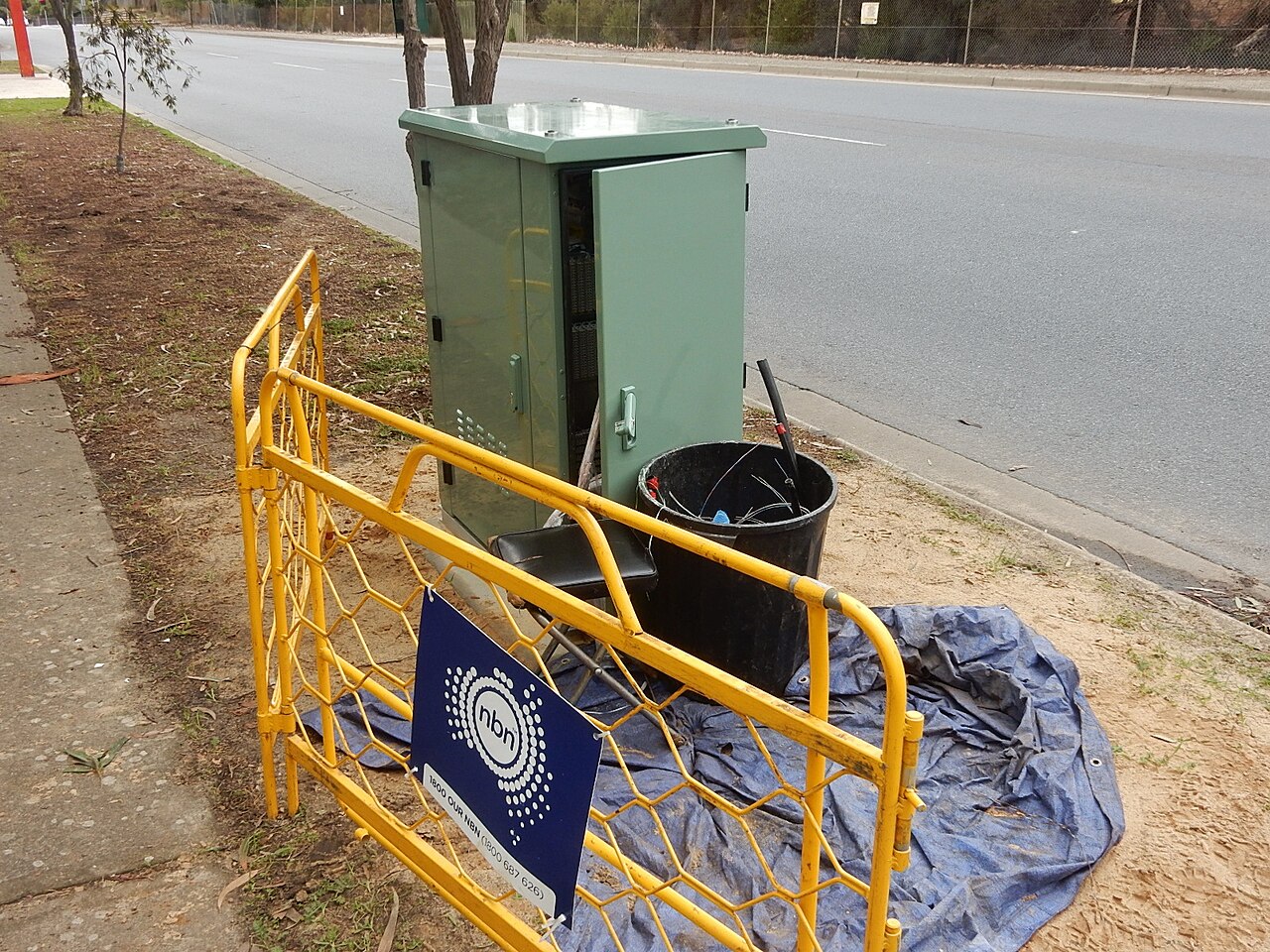
FTTN means fibre to the node. The "node" is a cabinet, usually on a footpath or nature strip near your home, that links nbn's fibre network to the copper phone lines that already run into nearby houses.
You'll see FTTN written as "nbn FTTN", "FTTN nbn" or "fibre to the node". They all refer to the same connection type. FTTN is one of seven NBN connection types, and it's one of the three that rely on copper for the final part of the connection, alongside fibre to the curb (FTTC) and fibre to the building (FTTB).
FTTN became part of the NBN when the rollout moved to a mix of technologies in the mid 2010s. Reusing the copper network let nbn connect homes faster and at a lower cost than running fibre to every property.
How does FTTN work?
Your internet signal travels over fibre optic cable from the exchange to the node in your street. At the node, equipment converts the signal so it can travel over the copper phone line to the telephone wall socket in your home. Your modem plugs into that wall socket and turns the signal into an internet connection for your devices.
FTTN uses a technology called VDSL2 to send data over the copper. It's a faster successor to the ADSL technology that older broadband services used, and it works over much shorter copper runs. nbn said FTTN would reduce the average copper line length from about 2 km on ADSL to around 450 metres, with roughly two thirds of users within 400 metres of their node.
That copper section is the main limit on FTTN. Signals weaken as they travel along copper, so a home 200 metres from the node will usually get faster speeds than a home 800 metres away. The age of the cable, corrosion and the quality of the joints along the line also impact performance.
What speeds can you get on FTTN?
FTTN homes can order plans with download speeds of up to 100 Mbps. When nbn lifted its top speed tiers in September 2025, the faster speeds were limited to homes on Fibre to the Premises (FTTP) or Hybrid Fibre Coaxial (HFC).
The ACCC confirms that FTTN and FTTC can't access the upgraded 500/50 Mbps Home Fast plan, so 100 Mbps remains the ceiling on these connection types.
The table below shows how FTTN compares with the two fastest NBN connection types.
| Connection type | Fastest wholesale download speed | Fastest wholesale upload speed |
|---|---|---|
| FTTN | 100 Mbps | Depends on plan and line |
| HFC | 2,000 Mbps | 100 Mbps |
| FTTP | 2,000 Mbps | 200 Mbps |
The FTTN figure is from the ACCC report above, and the HFC and FTTP figures are from nbn's speed tier announcement.
Why your FTTN line may not reach your plan speed
Every FTTN line has a maximum attainable speed, which is the fastest speed that particular copper line can carry. If that's lower than the speed of your plan, you won't get your plan speed no matter what your provider does. The ACCC calls these lines "impaired".
This is the most common reason FTTN underperforms. In its September 2025 report, the ACCC found that FTTN connections on 50 or 100 Mbps plans made up 86 per cent of all underperforming connections in its testing, and nearly all of those underperforming FTTN lines were also impaired.
The same report found FTTN connections on 25 Mbps plans tended to deliver their plan speed, because lower speeds are easier for long or older copper lines to carry.
Your provider can't confirm your line's maximum speed until your service is connected. The ACCC says retailers need to tell you if your FTTN connection can't achieve your plan speed.
If that happens, ask your provider about moving to a plan your line can support, so you're not paying for speed you can't use.
FTTN reliability
FTTN also drops out more often than full fibre. In a June 2024 report, the ACCC found that FTTN accounted for 48 per cent of the services that experienced an outage on most days, compared with 12 per cent for FTTP.
What equipment do you need for FTTN?
FTTN is simpler at home than most other NBN connection types, because there's no nbn connection box. You need:
- A telephone wall socket: Your modem plugs into an existing phone socket. nbn says older "600 series" sockets need an RJ11 adapter, and adding a socket in another room requires a registered cabler, which may cost extra.
- A VDSL2 modem: Your provider usually supplies one. If you'd rather use your own, it must be VDSL2 compatible. A standard Wi-Fi router without a built-in VDSL2 modem won't connect to an FTTN line on its own.
If you've moved from ADSL, remove any old ADSL filters or other devices between the modem and the wall socket. nbn warns that the connection may not work, or may be limited in performance, if they're left in place. nbn also says pulse or rotary dial phones aren't compatible with FTTN.
How to get the best speed from FTTN
You can't change how far your home is from the node, but you can make sure nothing inside your home is slowing the connection down.
- Use the main phone socket. Plug your modem into the socket closest to where the phone line enters your home. Extra internal wiring and extension sockets add length and joints to the copper run.
- Remove old filters and splitters. ADSL filters, old phone extension leads and double adapters can all interfere with the signal.
- Check your modem. An older or non VDSL2 modem can cause dropouts or slow speeds. Ask your provider whether your modem is suitable.
- Pick a plan your line supports. If your provider tells you your maximum attainable speed is below your plan speed, a slower plan may cost less without changing your experience.
- Test with a cable. Run a speed test on a device connected to the modem with an Ethernet cable. If the wired result is fine but Wi-Fi is slow, the problem is your home Wi-Fi rather than the FTTN line.
If you've done all this and your speeds are still poor, contact your provider. They can run line tests and raise a fault with nbn if needed.
FTTN vs FTTP: what's the difference?
The difference between fibre to the node and fibre to the premises is the last part of the connection. FTTN uses copper from the street cabinet to your home, while FTTP runs fibre all the way to an nbn connection box inside your home.
That one change has a big effect:
- Speed: FTTP can access every residential speed tier, up to 2,000 Mbps download currently. FTTN tops out at 100 Mbps.
- Consistency: Fibre isn't affected by distance in the way copper is, so FTTP homes generally get close to their plan speed regardless of where they sit on the street.
- Reliability: FTTP had far fewer frequent outages than FTTN in the ACCC's testing.
Our guide to what FTTP is explains full fibre connections in more detail. HFC is the other connection type that can access multi gigabit speeds, and our guide to what HFC is covers how it works.
Can you upgrade from FTTN to FTTP?
nbn's fibre upgrade program lets eligible FTTN homes switch to FTTP by ordering a plan based on nbn Home Fast or a faster speed tier from a participating provider.
Other conditions apply, including nbn designating your home as a "simple premises". Installation of nbn supplied equipment is free, although nbn says additional costs may apply to providers, who may choose to pass them on.
Once you're on FTTP, a Home Fast plan runs at up to 500/50 Mbps wholesale, rather than the 100 Mbps ceiling on FTTN.
The upgrade program has grown quickly. In its August 2026 results statement, nbn said it had made 3.5 million FTTN customers eligible to order a full fibre upgrade, and more than 1.38 million homes and businesses had upgraded through the program.
Work is now under way on the remaining FTTN footprint, with nbn saying in September 2026 that around 91,000 of those premises can already order an upgrade.
Will I be forced to leave FTTN?
In April 2026, nbn announced a Targeted Upgrade program to move selected homes and businesses from legacy copper connections to full fibre in areas where fibre is already available.
nbn plans to start sending notifications from July 2027 and aims to upgrade about 130,000 premises in the first year. Upgrades under this program won't require a high speed plan, and you can stay on your existing speed tier where that applies.
nbn says suspending a copper service is a last resort, and the first suspensions for homes that don't place an upgrade order aren't expected until January 2028. If your home is eligible for an upgrade now, you can order one at any time instead of waiting to be contacted.
How to check if you have FTTN
The easiest way is to enter your address on the nbn website, which shows your connection type and whether a fibre upgrade is available.
You can also check your equipment. An FTTN home has no nbn connection box, and the modem plugs straight into a telephone wall socket.
FTTB looks the same inside the home but is used in apartment buildings, where the fibre runs to a communications room in the building instead of a street cabinet.
Your provider can also confirm your connection type, and it usually appears in your account or on your plan's Critical Information Summary.
Does FTTN work in a blackout?
Your modem needs mains power, and the node in your street needs power too, so FTTN won't work in a blackout. nbn's power outage guide says landline phone and internet services won't work if there's a power outage in the FTTN network or in your home, and backup power at home won't help if the node itself has lost power.
nbn recommends keeping a charged mobile phone nearby. If you rely on a medical alarm or another device that needs a working connection, ask your provider about backup options.
Image: Michael Coghlan, CC BY-SA 2.0, via Wikimedia Commons

See if you can save
Enter your address and compare plans from Australia's leading retailers.
Frequently asked questions
What is FTTN on the NBN?
Is FTTN good?
What is the maximum speed on FTTN?
Is FTTN the same as ADSL?
What modem do I need for FTTN?
Is FTTN being phased out?
Is the upgrade from FTTN to FTTP free?
Keep reading
HFC vs FTTP: how the two fastest NBN connections compare
HFC and FTTP are the only NBN connection types that can access every speed tier, up to 2,000 Mbps. This guide explains where they differ, from upload speeds to reliability, and whether you can switch.
What is HFC? NBN hybrid fibre coaxial explained
HFC is the NBN connection type that reuses the coaxial cable built for pay TV in the 1990s. Here's how an HFC connection works, what equipment you get, and how it stacks up against full fibre.
NBN fibre upgrades: how to get FTTP
Millions of homes on FTTN and FTTC can now upgrade to full fibre. Here's how the NBN fibre upgrade works, who's eligible, which plan you need, what it costs and what to expect from the FTTP upgrade.