What is FTTP? NBN Fibre to the Premises explained
FTTP runs fibre optic cable all the way to your home, making it the fastest and most reliable NBN connection type. Here's how it works, the speeds it supports and how it compares to Fibre to the Curb.
On this page
- Quick facts
- What does FTTP mean?
- How does FTTP work?
- What equipment comes with an FTTP connection?
- Does FTTP work in a power outage?
- What speeds can you get on FTTP?
- FTTC vs FTTP: what's the difference?
- Who has FTTP?
- How to check if you have FTTP or can upgrade
- What to expect at an FTTP installation
- Is FTTP worth it?
- Compare NBN plans for FTTP
FTTP stands for Fibre to the Premises. It's the NBN connection type where fibre optic cable runs all the way into your home, with no copper phone line involved. Because the whole connection is fibre, FTTP can access every fixed line NBN speed tier, including the fastest plans available to households.
FTTP is also the connection type nbn is moving its fixed line network towards. Millions of homes that started on copper-based Fibre to the Node (FTTN) or Fibre to the Curb (FTTC) connections can now upgrade, which is why more Australians are asking what FTTP is and whether it's worth having.
Quick facts
- FTTP means Fibre to the Premises, where a fibre optic line runs from the nearest fibre node directly to your home.
- FTTP supports every fixed line speed tier, including Home Hyperfast at 2000/200 Mbps, which has the highest upload speed nbn offers to homes.
- FTTP is the most common nbn connection type, making up around 38 per cent of nbn connections as of July 2026, according to nbn.
- More than 7.8 million homes and businesses had access to a fibre service as of September 2026, according to nbn.
- FTTP equipment needs mains power, so your internet won't work in a blackout unless the connection box and your router have a backup power source.
- Many FTTN and FTTC homes can upgrade to FTTP, and since 1 July 2026 FTTC customers no longer need to order a high-speed plan to qualify.
What does FTTP mean?
FTTP means Fibre to the Premises. "Premises" is the industry term for any home or business with an NBN connection, so you'll sometimes also hear FTTP called "full fibre" or "fibre to the home". nbn uses "full fibre" in much of its consumer material, and the terms mean the same thing on the NBN.
FTTP is one of seven NBN connection types. The others use a different technology for the last stretch to your home, such as the existing copper phone line or the old pay TV cable network. Our guide to NBN connection types explains how all seven compare.
How does FTTP work?
With FTTP, nbn runs a fibre optic line from the nearest available fibre node directly to your premises. Fibre optic cable carries data as pulses of light through thin strands of glass, rather than as electrical signals through copper wire. Light signals don't weaken over distance in the same way copper signals do, which is why FTTP speeds don't depend on how far your home is from the nearest piece of nbn equipment.
On other fixed line connections, the fibre stops short of your home. FTTN fibre ends at a cabinet on the street and uses the copper phone line for the rest of the way, while FTTC fibre ends at a pit outside your property. Those copper sections are what limit speeds on the older connection types.
What equipment comes with an FTTP connection?
An FTTP installation includes two pieces of nbn equipment:
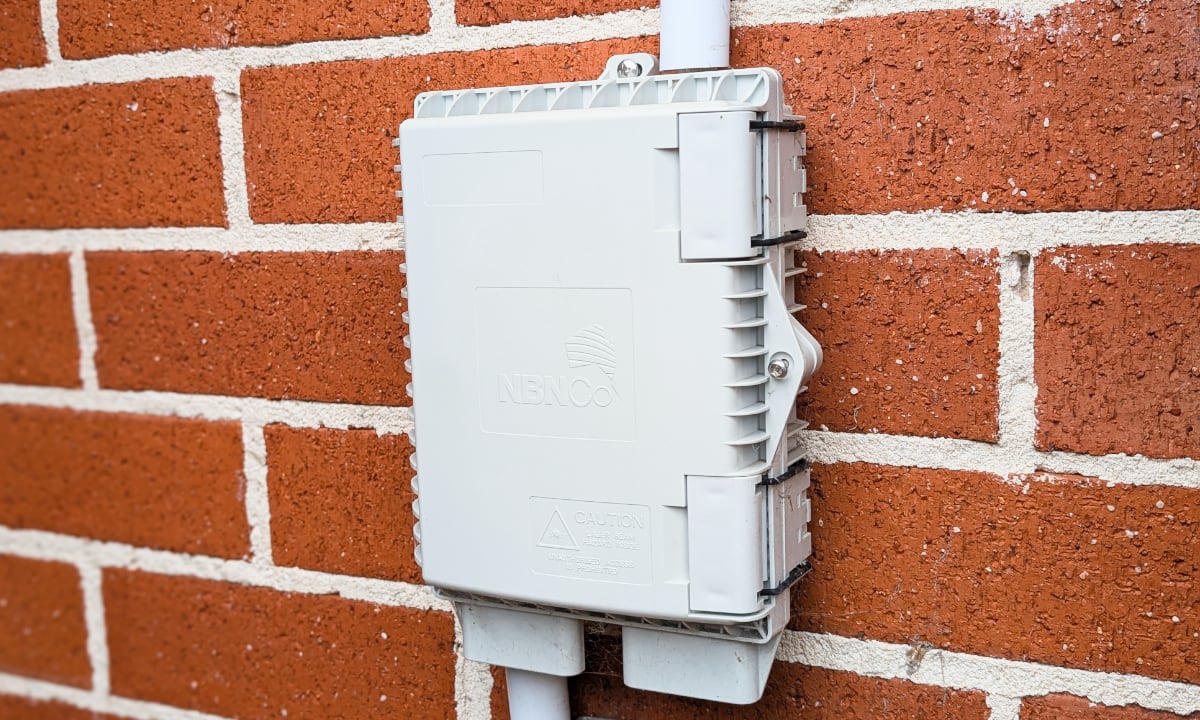
- nbn utility box: This is a small box on the outside of your home, usually at the front of the property near the existing telecommunications box. The fibre from the street ends here.
- nbn connection box: This box sits inside your home and connects to the utility box with a fibre cable. Your router or modem plugs into the connection box with an Ethernet cable.
The connection box is also known as the Network Termination Device (NTD). Most homes get a connection box with a single port, while a four-port version is typically used for premises that need more than one FTTP service.
The equipment belongs to nbn and stays with the property. If you want to move the connection box to another room, nbn says an ACMA-accredited registered cabler can relocate it within your home, while moving equipment on the outside of the premises needs to go through nbn's relocation works process.
Does FTTP work in a power outage?
nbn states that both the connection box and your Wi-Fi router must be plugged into a power outlet, so the connection stops working when the power goes out.
Some FTTP homes have an nbn Power Supply with Battery Backup. nbn says a battery backup can power the connection box for up to approximately five hours during an outage. The battery only powers the connection box, so your router also needs its own backup power for the internet to keep working.
If you rely on a medical alarm or a Priority Assistance phone service, talk to your provider about what will work during a blackout.
What speeds can you get on FTTP?
FTTP can access every fixed line speed tier nbn sells. The table below shows the wholesale speeds nbn provides to internet providers on FTTP, taken from nbn's speed plans page.
| Speed tier | Wholesale download (Mbps) | Wholesale upload (Mbps) |
|---|---|---|
| Home Hyperfast | 2000 | 200 |
| Home Ultrafast | Around 1000 | 100 |
| Home Superfast | 750 | 50 |
| Home Fast II | 500 | 50 |
| Home Standard | 50 | 20 |
| Home Basic II | 25 | 10 |
| Home Basic I | 12 | 1 |
These are the maximum speeds nbn delivers to providers, not a guarantee of what you'll get at home. nbn notes that actual speeds may be lower, particularly during busy periods. Your provider's network, your plan, your router and your Wi-Fi setup all affect the speeds you see.
FTTP and Hybrid Fibre Coaxial (HFC) are the only connection types that can access the 500 Mbps and faster tiers. Of the two, FTTP has the higher upload speed on the top tier, at 200 Mbps compared with 100 Mbps on HFC. Faster uploads help with video calls, backing up files to the cloud and sending large files for work.
Not every provider sells plans on every tier, so check which speeds a provider offers before you sign up.
FTTC vs FTTP: what's the difference?
FTTC and FTTP both bring fibre close to your home, but only FTTP takes it all the way. With FTTC, fibre ends at a small Distribution Point Unit that is generally located inside a pit on the street, and the existing copper phone line carries the signal from there into your home.
| FTTP | FTTC | |
|---|---|---|
| Where the fibre ends | Inside your home | A pit in the street |
| What carries the final stretch | Fibre optic cable | Existing copper phone line |
| Fastest wholesale tier | 2000/200 Mbps | 50 to 100/20 Mbps |
| Access to 500 Mbps and faster tiers | Yes | No |
| Equipment inside your home | Connection box linked to the utility box by fibre | Connection box plugged into the phone wall socket |
| Works in a blackout | Only with backup power | No |
Speed figures are from nbn's speed plans page. The FTTC range shows the top speed a line may reach on the Home Fast I tier, and the speed you get depends on the condition of the copper line to your home.
Reliability is the other big difference. nbn has said it is prioritising FTTC customers for upgrades because FTTC fault rates are higher than those of its other copper-based networks. Copper can be affected by water in pits, corrosion and line damage, while a fibre connection doesn't have a copper section to fail.
If you're on FTTC, you may be able to switch. From 1 July 2026, nbn removed the requirement for FTTC customers to order a high-speed plan to qualify for a full fibre upgrade, so eligible customers can now request an upgrade on any plan.
Who has FTTP?
FTTP is now the most widely used connection on the NBN. nbn reported 3.3 million premises on its fibre network at the end of the 2025 to 26 financial year, after more than 575,000 homes and businesses upgraded from copper to fibre during that year.
You're most likely to have FTTP if you live in:
- an area that received full fibre during the original NBN rollout
- a newer suburb or housing estate
- an FTTN or FTTC area where you or a previous occupant has already upgraded
nbn plans to keep growing the fibre footprint. In September 2026, it said more than 99 per cent of the approximately 600,000 premises remaining in its FTTN upgrade program will have access to an FTTP upgrade by December 2030.
How to check if you have FTTP or can upgrade
The quickest way to check your connection type is to enter your address in the address checker on the nbn website. The result shows your current technology and whether a fibre upgrade is available at your address.
You can also check your equipment. An FTTP home has an nbn utility box on the outside wall and a connection box inside that isn't plugged into a telephone wall socket. If your modem plugs straight into the phone socket, you're likely on FTTN or Fibre to the Building (FTTB), and if your connection box plugs into the phone socket, you're likely on FTTC.
If an upgrade is available, nbn says you need to order an eligible full fibre plan through a participating provider, who then arranges the installation. The new fibre connection is installed alongside your existing service, and nbn notes that extra costs may apply to providers depending on factors such as complexity and building type, which providers may pass on.
What to expect at an FTTP installation
Your internet provider books the installation appointment with nbn. There are a few things to sort out before the technician arrives:
- An authorised person aged 18 or over needs to be home for the whole appointment, and they'll be asked to sign off on where the equipment goes and how the cables are run.
- Renters need the landlord's permission before the appointment is confirmed.
- The connection box needs to go in a cool, dry, ventilated spot near a power outlet, away from wet areas and direct sunlight.
On the day, the technician installs the utility box, runs the fibre cabling and fits the connection box. The service isn't active until your provider switches on your plan, so the utility box on its own doesn't give you a working connection.
Is FTTP worth it?
For most households, FTTP is the best NBN connection type you can have. It supports the fastest speed tiers, it has the highest upload speeds, and full fibre is far more reliable than its copper-based networks.
That doesn't mean everyone needs a top-tier plan. FTTP gives you room to move to a faster plan if your household's needs grow, but a 50 Mbps or 100 Mbps plan on FTTP will still suit many smaller households.
Your Wi-Fi setup also matters more on fast fibre plans, because an older router can become the bottleneck before the NBN connection does.
Compare NBN plans for FTTP
Once you know you're on FTTP, you can choose from the full range of NBN speed tiers. You can compare internet plans to find one that suits your household, or talk to the UtilityClub team about which speed makes sense for you.
If you're moving into a home with FTTP, our moving service can help you get the internet and utilities connected in one go.
See if you can save
Enter your address and compare plans from Australia's leading retailers.
Frequently asked questions
What is FTTP?
What is FTTP on the NBN?
Is FTTP better than FTTC?
Is FTTP the same as full fibre?
Can I upgrade to FTTP for free?
Do I need a new modem for FTTP?
Does FTTP need power?
Keep reading

NBN connection types explained
The NBN reaches homes through different connection types, and the one at your address decides which speeds you can get. Here's how each type works, its top speed and how to find out which you have.
Fixed price electricity vs variable rate plans explained
A fixed price electricity plan locks your rates for a set period, while a variable plan lets your retailer change them. Here's what each type protects you from and how to choose.

What Is the Sun Tax? Solar Export Charges Explained
"Sun tax" is the nickname for two-way network pricing, which lets electricity networks charge for solar exported in the middle of the day and pay a credit for exports in the evening.